2026 Business Card Calendar
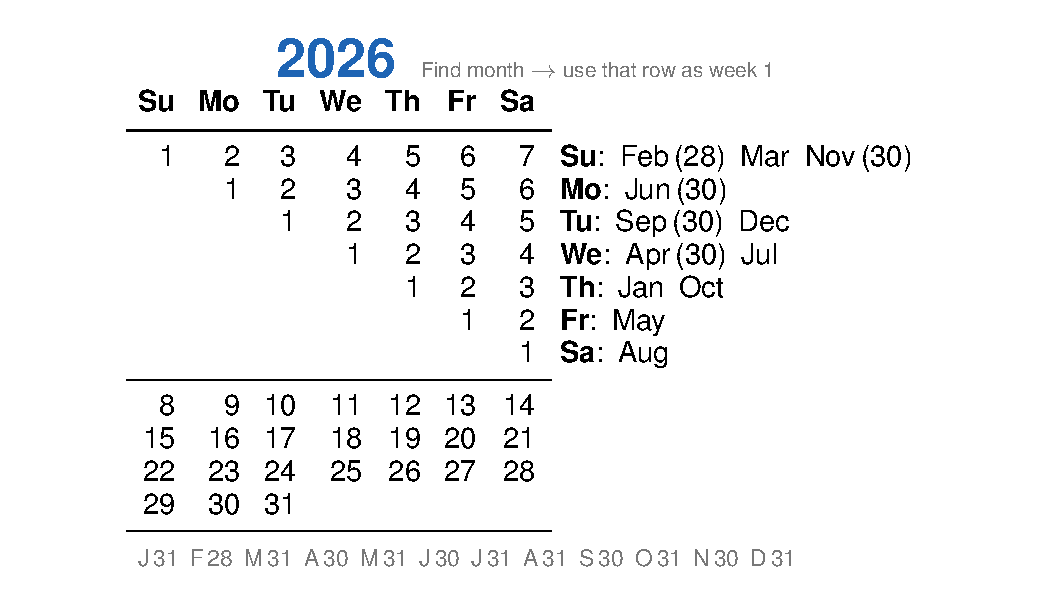
A complete year on a 3.5 × 2″ card — the clever trick: every month shares the same lower rows (8–14, 15–21…). Only the first week shifts, and the month key tells you exactly where to start.
How to read it
- Find your month in the right-hand column (e.g. August → Sa).
- Use the Sa row as the first week of that month — Saturday is the 1st.
- The rows 8–14, 15–21, 22–28, 29–31 are identical for every month; just continue downward.
- The footer shows how many days each month has, so you know where to stop.
Downloads
The alignment trick
A standard monthly calendar repeats four or five rows of dates (the "weeks 2–5" rows: 8–14, 15–21, 22–28, 29–31) identically every month — only the first row changes based on which day of the week the 1st falls on. There are only seven possible first rows, so the entire year can be encoded as one universal grid plus a seven-entry lookup.
Months with fewer days simply stop early — the footer
F 28 A 30… tells you where each month ends.
Two months sharing the same start-day key (e.g. Jan & Oct
both start on Thursday in 2026) are fully identical calendars — a fact hidden in
plain sight that this card makes instantly visible.